
CKEditor
CKEditor is a WYSIWYG HTML editor, available as a Javascript library. This could be used as part of a simple CMS.
Installation and testing
Section titled “Installation and testing”Download the JavaScript library
Section titled “Download the JavaScript library”It resides in its own directory, so deploy it on your website where it can be accessed by your webpages.
Import library using script tag
Section titled “Import library using script tag”<script type="text/javascript" src="/ckeditor/ckeditor.js">The example above assumes you have uploaded it into /ckeditor/ on your server.
Draw a textarea and replace with a CKEditor instance
Section titled “Draw a textarea and replace with a CKEditor instance”<textarea id="editor1" name="editor1">Sample initial text</textarea><script type="text/javascript"> CKEDITOR.replace( 'editor1' );</script>Instead of a textarea that can only edit pure text, you can use CKEditor and replace the textarea with an editor. The data from the editor is retrieved as HTML text, so you can still save it and use it later without the CKEditor library.
Add a button to get the value for testing purposes
Section titled “Add a button to get the value for testing purposes”<button id="editTest">Test</button><script type="text/javascript"> $('#editTest').click(function () { alert(CKEDITOR.instances.editor1.getData()); });</script>When the button is clicked, an alert with the editor data will appear.
Screenshots
Section titled “Screenshots”CKEditor in HTML mode
Section titled “CKEditor in HTML mode”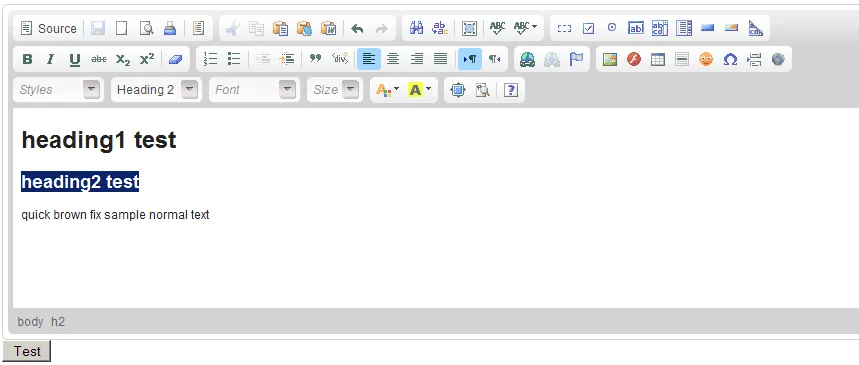 CKEditor in HTML mode
The user can highlight text and apply formatting of styles.
CKEditor in source mode
Section titled “CKEditor in source mode”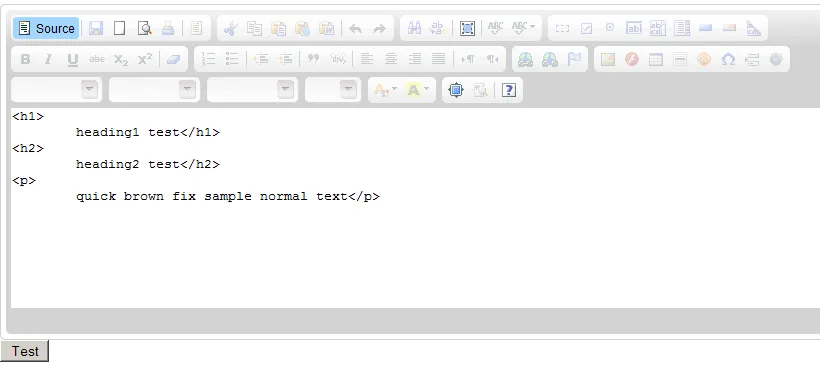 The resulting HTML is not neat, it will have extra spaces in the code, but visually it is readable.
You have the option of editing in raw HTML mode with a preview function. I’m not sure if you can hide or disable
certain buttons - I have not tried this.
The resulting HTML is not neat, it will have extra spaces in the code, but visually it is readable.
You have the option of editing in raw HTML mode with a preview function. I’m not sure if you can hide or disable
certain buttons - I have not tried this.